

What Do You Want To Be True?
I had a blinding flash of the obvious the other day: I realized why I’d been falling behind on my commitments and feeling more stressed out the last few weeks.
I’d fallen for the lure of the urgent important and been chasing shiny trinkets of faux productivity. And it wasn’t because I didn’t have enough time, although that would have been a convenient – and irresponsible – excuse. It was because instead of leading my schedule, I’d let myself by led by it.
Ever feel like you’re caught up in doing, but not sure if you’re doing what you should be doing? It’s scary to think we could be throwing all our time and energy into climbing a ladder, only to find at the top it’s been leaning on the wrong wall.
Luckily for me, I have a method I’ve used throughout the years to help me get back on track – fast.
The Urgent Isn’t Always Important
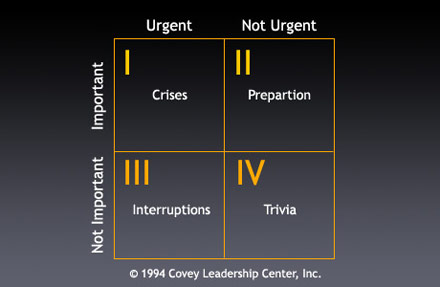
Stephen Covey, in his must-read book First Things First, outlined these 4 Quadrants. If you find your life spiraling out of control, you need to know the 4 Quadrants and why they’re important.
Quadrant 1 are the things in your life that are both urgent and important. Matters like deadline-driven projects and crises. We all have Q1 activities in our lives, but if you’re feeling burnt out, chances are you live here.
Quadrant 2 is full of things that are not urgent but important which could range from spending quality time with your family to regular exercise. They won’t enact urgency on you like a deadline but they’re the foundations a quality life is built on.
The more time you spend in Q2, planning, building up your strength, preparing, the less time you spend and the more effective you become in Q1.
Quadrant 3 is where the urgent but not important matters lie. Some phone calls, meetings, last minute appointments that seem urgent but are actually not important fall into Q3.
Quadrant 4 are where the frivolous not urgent and not important stuff is. Stoning out in front of the TV, not learning and doing anything is a Q4 activity.
It’s obvious we should be spending most of our time in Q1 & 2. Spending too much time in Q3 and Q4 robs you of your time, gives you stress and saps your ability to perform in real Q1 and Q3 activities.
Which quadrant do you think you’re spending most of your time right now?
Think about the answer in the meantime. In my next post I’ll reveal how to make the 4 Quadrants an even more useful tool for leading your life.
Getting Your Life On Track Series
Getting Your Life On Track Part 1
Getting Your Life On Track Part 2
Getting Your Life On Track Part 3
Getting Your Life On Track Part 4